How Micro-Businesses Can Pick (and Afford) Online Payroll Software in 5 Steps

Payday shouldn’t cause a knot in your stomach. In 2023 alone, nearly one-third of U.S. employers miscalculated payroll, and the IRS collected roughly $6.9 billion in penalties. For a micro-business, that cash could fuel growth—not sit in a government account.
Web-based payroll software—some plans start at $0 per month—now handles the tax math for you. We’ll walk you through five quick steps—size up your needs, rank must-have features, compare budget-friendly apps, test the front-runners, and launch the winner—so your next pay cycle is quick, compliant, and drama-free.
Step 1 – Assess your payroll needs and constraints
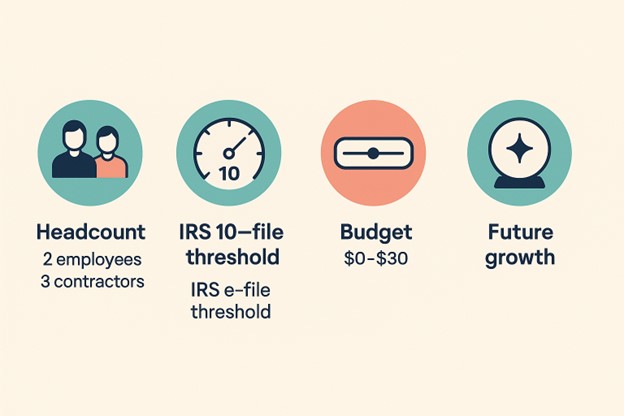
Start by understanding how your business handles payroll, because software only works well when it matches the way you operate. Begin with a clear count of everyone you pay and classify each individual as either a W-2 employee or a 1099 contractor. If your team consists entirely of contractors, a contractor-only payroll plan may be your best bet—these often come with no monthly base fee and a low per-contractor cost, making them perfect for lean teams. Also consider your pay schedule; opting for monthly payroll instead of weekly can significantly reduce per-person processing fees, making your when you really think about it payroll solution more affordable.
Next, factor in compliance obligations that now apply even to very small businesses. Since January 1, 2024, the IRS mandates electronic filing for anyone submitting 10 or more W-2 or 1099 forms annually. That threshold includes many micro-businesses with just a few full-time staff and some part-time help. Therefore, it’s important to choose payroll software that either files electronically on your behalf or gives you export-ready forms for upload. For W-2s specifically, an online W-2 generator such as FormPros streamlines the process by producing IRS-ready copies you can e-file or hand to employees in minutes. Finally, assess your budget. Can you comfortably spend $30 a month on payroll software, or do you need a $0 solution that trades automation for more manual work? Set a hard budget ceiling early to avoid overspending on features you may never use. And don’t forget to consider any upcoming changes—like hiring across state lines, managing tipped wages, or complying with new retirement plan mandates—that could impact your software choice down the line. Completing this assessment now will simplify every later decision and help you avoid costly missteps when tax season rolls around.
Step 2 – Prioritize the features you must have
When evaluating online payroll software for your small business, don’t be distracted by flashy bells and whistles. Most micro-businesses don’t need an all-in-one enterprise payroll suite; instead, focus on core features that either safeguard your money or save your time. One of the most critical is full-service tax filing. Missing even a single payroll deposit can trigger steep IRS penalties—ranging from 2% to 15% of the overdue amount—so choosing software that automatically calculates, files, and remits payroll taxes can easily pay for itself. Another essential have is free direct deposit. Paper checks may seem simple, but they typically cost $2–$4 each to issue, while ACH transfers cost only cents. Free ACH deposits keep payroll expenses predictable and ensure employees are paid promptly.
Other smart features offer time-saving convenience, especially if you’re a one-person HR department. Employee self-service portals are invaluable—they allow workers to access pay stubs, update their addresses, or retrieve W-2s without emailing you every tax season. Likewise, having integrated time tracking or a smooth sync from a time-tracking tool reduces costly errors caused by codex data entry. If your payroll requires hourly calculations or overtime, this have helps maintain accuracy and reduces rework. Finally, consider -proofing your choice. Even if your current setup is simple, picking a platform that supports multi-state payroll, tip reporting, or benefits administration means you won’t need to switch systems as you grow. By zeroing in on only the most essential features now, you’ll avoid bloated costs and stay focused on what truly matters to your business.
Step 3 – Explore your options
With your must-have list in hand, compare tools in three price tiers—free, budget, and full service. First, run a quick math check:
True monthly cost = Base fee + (workers × per-person fee).
A plan that charges $35 plus $6 per worker costs $53 for three employees, or $636 a year before add-ons.
1. Free or near-free
- FormPros – pay stub generator – A low-cost, pay-as-you-go solution perfect for DIY payroll. Instantly creates professional pay stubs with accurate tax calculations. Great for very small teams or solopreneurs who want to avoid full-service software fees while staying compliant.
- Payroll4Free – $0 for up to twenty-five workers; calculates taxes and prints W-2s. Optional tax filing or in-house direct deposit costs $30 each per month, or $40 for both.
- Wave Payroll (self-service states) – $20 base plus $6 per worker where Wave does not e-file taxes; full-service states rise to $40 base.
- Square Payroll – contractor plan – $6 per contractor, $0 base, and no charge in months you pay nobody.
- Gusto – contractor-only plan – $0 base for six months, then $35; $6 per contractor.
- my / TimeTrex Community – open source or donation supported, $0 forever, but you handle every filing.
These tools suit founders who prefer do-it-yourself tax filing to save cash.
2. Contractor-only bargains
- Square Payroll – $0 base; $6 per contractor, billed only in months you pay.
- Gusto Contractor Only – $0 base for six months, then $35; $6 per contractor.
Start here if you mainly pay freelancers, and upgrade when you hire employees.
3. Low-cost full service
| Provider | Base / mo | Per-worker | Tax filing | Notable perk |
| Patriot Basic | $17 | $4 | Self-file | Cheapest paid option |
| Patriot Full | $37 | $5 | Included | Accuracy guarantee |
| Square Payroll (employees) | $35 | $6 | Included | Same-day deposits |
| Gusto Simple | $49 | $6 | Included | Built-in HR tools |
| OnPay | $40 | $6 | Included | Multi-state at no extra cost |
Worked example: Two employees on Patriot Full Service cost $37 + (2 × $5) = $47 a month—about $564 per year for hands-off compliance.
If that still feels steep, keep Form Pros Pay-Stub Generator in your back pocket. Paired with a spreadsheet, it lets you issue compliant stubs for roughly the price of a latte per pay period while you build revenue.
Test each platform, enter your real headcount, and stick with the options that land inside the ceiling you set in Step 1.
Know the price formula before you shop
Before committing to any payroll software, it’s important to understand how pricing really works. Most platforms follow a simple formula: monthly base fee plus a per-employee fee multiplied by headcount. For example, a plan with a $35 base and a $5 per-worker charge would cost $50 per month if you have three employees—adding up to $600 per year. While this might seem affordable at first glance, several hidden profit-eaters can quickly push a plan past your budget ceiling.
One common cost trap is run frequency. Some providers charge the per-person fee every time you process payroll, which means running weekly payroll could cost four times as much as a monthly schedule. Then there are promotional offers—a tempting 50% discount for three months might save you $75 upfront, but could quietly add over $300 in extra expenses for the remainder of the year. Finally, watch out for hidden add-ons, like fees for same-day direct deposit, end-of-year W-2 generation, or state-specific compliance features, which may tack on an extra $2 to $10 per worker. To avoid surprises, plug your own numbers into the formula and drop any plans that don’t align with your long-term payroll budget.
Step 4 – Test-drive your top choices
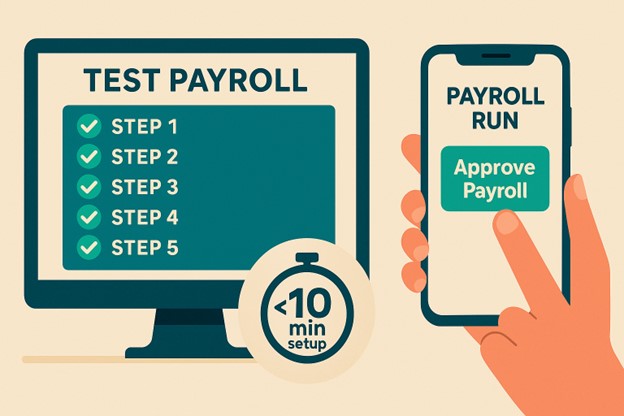
Before committing to any online payroll software, it’s essential to take it for a real-world spin. A live trial reveals limitations that polished marketing materials won’t show. Set aside an hour, pick two top contenders, and simulate a complete payroll scenario using real data. Start by adding yourself and one employee, input their actual pay rates, and schedule an upcoming payday. If this basic setup takes longer than ten minutes, it’s a red flag—imagine how much time you’ll lose onboarding a full team down the line.
Next, run a full payroll cycle by entering sample hours, reviewing tax calculations, and finalizing the run. Pay attention to the number of clicks and the total time required. If it takes more than five minutes to complete a simple payroll, the platform might become a source of frustration during busy weeks. After running payroll, generate a pay stub and tax report, then cross-check the net pay with your own spreadsheet or a trusted pay stub generator like FormPros. If the totals don’t match exactly—down to the cent—it’s a cue to investigate further.
While still in the trial, evaluate support responsiveness by sending a basic question through live chat, like “How do I void a payroll?” Top-tier providers typically reply within three minutes. Delayed or vague responses now often foreshadow long wait times when real problems arise. Finally, test the platform on mobile. Try approving a payroll draft and downloading a pay stub on your phone. The interface should be intuitive and touch-friendly; if you find yourself zooming or mis-tapping, it’s not mobile-ready. A platform that passes all five of these tests deserves a place on your shortlist—those that don’t are easier to walk away from before your employees rely on them.
Set up a live-fire trial
- Spin up two trials. Open accounts for your top two or three contenders in the same afternoon so impressions stay fresh.
- Load real data (ten minutes or less). Add yourself and one employee, enter actual pay rates, and schedule the next payday. If setup exceeds ten minutes, imagine onboarding ten people.
- Run a full cycle. Onboard the test employee, pivotal hours, preview taxes, and select Approve. Record clicks and total time.
- Spot friction fast. Watch for missing state-tax fields, hidden settings, or unclear error messages; small annoyances today grow with scale.
- Cross-check accuracy. Generate a pay stub and tax-liability report, then match net pay against your spreadsheet or a FormPros Variance should stay at or below $0.01.
If a platform clears all five checks, move on to support and mobile tests; if not, save yourself the January scramble and cut it now.
Probe support, mobility, and the final price tag
- Stress-test support. Still in trial, open chat and ask, “How do I add a new state tax?” Record the reply time. Leading payroll vendors answer in three minutes or less on average. Anything slower predicts long nights later.
- Check pocket-size usability. From your phone, log in, approve a draft payroll, and download a pay stub. If you need to pinch-zoom or hunt for buttons, mobile payday will feel painful on the road.
- Confirm true cost. After promos, add every fee—base, per-worker, year-end forms, off-cycle runs. The total must stay inside the ceiling you set in Step 1. If it exceeds that limit, thank the platform for the trial and move on.
Pass all three probes and the software graduates to finalist status; fail any probe and it is easier to switch before employees depend on it.
Step 5 – Use and onboard
Launch day—lock in a flawless first run
| Step | Target time | Why it matters |
| 1. Verify IDs (EIN and state tax numbers) | 5 min | A mistyped TIN can trigger penalties of up to $330 per form if uncorrected after August 1 |
| 2. Invite self-onboarding | 2 min per worker | Employees enter bank data themselves, reducing keystroke errors |
| 3. Set pay schedule and preview run | 3 min | Confirms deposit date and tax totals before money moves |
| 4. Parallel check with spreadsheet or FormPros stub | 5 min | Net pay variance should stay at $0.01 or less before approval |
| 5. Approve and save confirmation | 1 min | Creates an audit trail if questions arise later |
Hit every green check, and payroll is now cloud-based, compliant, and off your mental to-do list.
Keep payroll on autopilot and plan for growth
- Set a forty-eight-hour reminder. Two days before payday, review hours, PTO, and bonuses, even if auto-pay is enabled.
- Segregate taxes. After each run, transfer the exact tax debit shown on your payroll report into a dedicated sub-account. Many founders park twenty-five to thirty percent of gross payroll here to avoid surprise withdrawals.
- Act on compliance alerts weekly. Good software emails new state rates or filing deadlines; a five-minute Monday check prevents penalty notices that can exceed $50 per late form.
- Update your have list as you scale.
- Hire in a new state → enable multi-state payroll.
- Add benefits → turn on 401(k) or health modules.
- Shift contractors to employees → upgrade from a contractor-only tier.
- Run a December audit. Download year-to-date wage and tax summaries, match them to your books, and fix discrepancies before W-2s generate.
Build these five habits, and payroll becomes steady background noise, leaving you free to focus on sales rather than spreadsheets.
Conclusion: Your Payroll, Simplified and Scaled
Micro-businesses often walk a razor-thin line between resourceful and overwhelmed. But choosing the right online payroll software shouldn’t be the thing that maxims the scales. With the right steps—starting from a clear assessment of your headcount and budget ceiling, to a focused test drive of low-cost or free tools—you can turn a complex compliance task into a background process that quietly does its job while you do yours.
The best payroll software for small businesses isn’t always the flashiest or most expensive. It’s the one that protects your margins, prevents IRS penalties, and fits into your existing workflow without requiring you to become a part-time tax expert. Whether you land on a free DIY solution with codex filing or opt for a full-service provider with tax automation and employee portals, the important part is that it aligns with your business size, your constraints, and your growth plans.
And remember: not every payroll process starts with a subscription. If you’re just beginning to pay team members or contractors, a tool like Form Pros Pay Stub Generator lets you issue accurate, compliant pay stubs at a fraction of the cost of full-service software—no contracts, no monthly fees. It’s the perfect bridge between spreadsheets and software.
By following these five steps, you build a payroll system that scales with you. From day-one compliance to multi-state hiring and benefit rollouts, today’s lean approach sets you up for tomorrow’s growth. And once payroll is streamlined, you’re free to invest your energy where it matters most—winning clients, growing revenue, and delivering the creative worth only a small business can.

