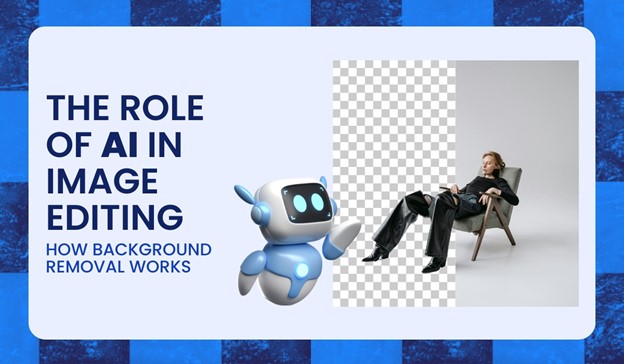
The Role of AI in Image Editing: How Background Removal Works
Within the last couple of years, artificial intelligence (AI) has brought about new fresh changes in the creative industry and changed the game for professionals and amateurs performing complex tasks.
The subject of background removal has gained so much popularity in recent times regarding AI image editing. This acts to easily cut off the subject from the background for precise integration into a new environment.
The application of this technology is almost industry-specific. Marketers use it to improve advertisement appearances; e-commerce models apply it to give products another image; and photographers improve their photos by using what they sell there to improve the aesthetic quality.
With this, growing into a phenomenal tool, AI image editing became one of the most significant transformational aspects of the design revolution, improving the fields, such as photography and marketing. This change comes from the fact that AI photo editing tools take all the tedious, intricate processes, such as object detection, color grading, and background removal, to democratize highly professional results for the users within a fraction of the time that it takes to do it traditionally.
In this article, we are going to discuss how these new advances in AI change the face of image editing and how you can apply AI tools for photo editing in your creative projects.
What is AI in Image Editing?
The use of Artificial Intelligence in image editing means the use of AI algorithms and machine learning to automate tedious tasks such as background removal, retouching, and resizing. AI photo editing applications use of these algorithms to detect objects, color-correct, and improve images. Some software identifies all the elements inside an image to make minute adjustments that automatically simplify the entire process and thus improve your work productivity regardless of your skill level.
AI photo editors can be more efficient than others because they can analyze the visual data, reducing the workload of the task as well as providing uniform results.
AI also accelerates workflows for both professionals and hobbyists by automating time-consuming tasks. This makes it possible to focus on creative aspects of the project and get faster turnaround times as well as high-quality outputs.
When you really think about it, AI in image editing has become accessible to the masses, where anyone can now produce polished images without extensive training.
Understanding Background Removal
For many years, traditional methods of background removal were laborious, which necessitated a good deal of painstaking codex work. The process involved editors outlining and subsequently erasing the backgrounds pixel by pixel. So, it called for careful eye coordination and a steady hand. More than that, the complexity of the images, but, invariably led to inconsistent results, turning this whole exercise into a time-consuming impediment to productivity.
But all these AI-powered tools have cast their weight behind the completely transformational technology: automation at its heart. Using machine-learning models and advanced algorithms, now, it is easier to separate the foreground from the background of images. Furthermore, AI tools are faster and are highly accurate.
AI background removal allows the detection of the comprises the separation of the subject from surroundings at an incredible level of precision through employing highly efficient techniques. AI image editing also utilizes object recognition, edge detection, and complex algorithms to differentiate the background from the foreground and produces clean and accurate outputs.
● By object recognition and edge detection, the AI image editing tool creates a high-fine outline within contributions that is free from distortion on subjects after identifying significant objects in the picture.
● The algorithms work on pixel data to segregate the foreground from the background, ensuring smooth transitions without codex effort.
● Machine learning models trained on large datasets continue to produce increasingly better accuracy for images of diverse complexities, and so AI photo editors can be depended upon for many different jobs.
Examples of AI Background Removal Tools
AI transformed the entire background removal process, making it faster and much more precise. Several AI-powered tools are now making it easier to do the task for beginners as well as professionals. Here are some of them:

Source: https://removal.AI
1. Removal.AI
Removal.AI is an excellent example of an advanced background remover.
This platform uses highly upgraded algorithms that ensure, even in the most complicated images, accuracy and cleanliness of output. Its photo editing tool results in immense efficiencies of time as well as correctness at cost advantages.
It’s fast and delivers accurate results, ensuring it is a go-to choice for anyone needing quick and reliable background removal.

Source: https://www.adobe.com/ph_en/products/photoshop.html
2. Adobe Photoshop
Adobe Photoshop is one of the most popular tools for professionals. It is now integrating AI-driven features such as edge refinement and object detection.
Such new features allow users to customize and perfect their background removal process, making outputs highly detailed and professional. With AI tools for photo editing, Photoshop elevates what can be achieved in image editing, making it essential for creative professionals.

Source: https://www.canva.com/
3. Canva
Canva is another great tool that offers an AI photo editor for background removal. It’s easy to use and perfect for quick edits of social media graphics, marketing, and design projects.
This allows even the least experienced user or the most skilled designer to be able to simplify the editing process and create amazing visuals.
The Role of AI in Image Editing Beyond Background Removal
Source: https://www.gettyimages.ae/photos/draganab
Several strong features extend the capability of AI image editing, way past removing background. Some of the other qualities you can enjoy are as follows:
1. Retouching and Color Grading:
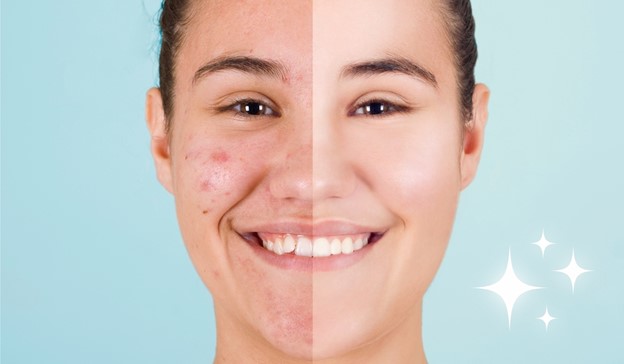
AI photo editing software can automatically sharpen an image to give greater clarity, contrast, and brightness. This aspect is useful where the image has been impacted by a difference in lighting or atmospheric conditions of its surroundings, so coming out very fine in appearance.
With this, it becomes effortless to improve the general quality of an image through AI in instances of working with difficult light conditions.
2. Selective Softening and Sharpening:
Some AI photo editing tools can selectively soften or sharpen images, an operation that required a lot of codex effort previously.
These tools automatically improve details and leave other parts untouched, helping you create a more refined final image.
3. Line Work and Rebuilding Strokes:
Newer AI photo editors can rebuild strokes and improve line work, which reduces tough activities associated with tasks that once required massive amounts of codex labor.
Such AI tools automate intricate processes, polish details without the need for a thorough level of expertise, and greatly minimize your painstaking chores.
4. Style Transfer and Creative Effects:
Now, the AI picture editing software also has style transfer, which allows users to change their pictures into other art or more creative outputs.
This may range from duplication of famous masters to artistic art filters, through which users experiment and acquire something unique in art without any deeper technical knowledge in that area.
5. Image upscaling with AI models:
Another precious have of AI photo editing tools is the upscaling of images.
AI models can upscale poorly made images while retaining the original detail of the image; so, it is perfect for larger formats without losing sharpness.
This is particularly helpful in restoring older images or improving the quality of compressed photos.
With the facility of features like background removers and auto-retouching, people without editing backgrounds can now come up with picture quality without an expert’s help.
The AI photo editing tools enable the easy simplification of complex tasks so that professional-grade visuals can easily be created. It is that democratic nature of image editing that empowers everybody to release their creativity, using it at their will and not necessarily under extensive training or technical skills.
Conclusion
Undeniably, AI has changed the way we see image editing. Using AI photo editing tools, a background removal that would take hours can now be done in seconds. It is now more than ever that the availability of AI-driven solutions for intricate processes, makes editing accessible and efficient for users of all skill levels.
In these times, these AI image editing tools have become necessities for professional users, yet simultaneously liberate potential laypersons to reach such high-quality content without the pain of acquiring master-level skills.
Truly, this time birthed too many radical AI photo editors, including Removal.AI, which uses highly upgraded algorithms to automate the background removal process with accuracy. Not only does it speed up workflows but it also makes it easier to achieve greater precision, giving content creators, designers, and marketers more opportunities to instantly produce clean, appealing visuals for any purpose.
Looking ahead, AI will go a lot further in terms of image editing. AI photo editors will be more leaned towards perfecting visuals in the matters of color correction, style transfer, and upscaling an image. This improvement will generally improve the whole process and make your artistic vision rather than focusing more on the technical effects of it all.
With these upcoming breakthroughs, platforms like a transparent background maker will undoubtedly revolutionize the way we create visual content and bring designing and editing closer to our fingertips—sooner, faster, and more convenient.
So, if you have not tried any of these AI photo editing applications yet, today is the best time to take a shot with them and see how they might take your work to the very best.

