
What Is The Difference Between Responsive Display Ads And Uploaded Display Ads?
Responsive display ads are like transformers—they adapt to fit everywhere, but uploaded display ads are the fancy cars you park for the show!

Picture this: you’re at a buffet where the chef magically tailors every dish to your taste (hello, responsive display ads). At the same time, your friend insists on bringing their perfectly plated meal from home (enter uploaded display ads).
What is the real advantage of responsive display ads?
They are like that chef, whipping up ads that just adjust to fit any plate—or platform—delivering both:
- Flexibility
- Reach
Meanwhile, uploaded display ads stick to the same recipe, no matter who’s hungry.
So, respective display ads are the jack-of-all-trades; uploaded display ads are the masters of one perfect look.
Ready to feast on the details? Let’s dive in!
What Are Responsive Display Ads?
A flexible ad style, responsive display ads (RDAs) automatically adjust to different screen sizes and locations. RDAs combine text, graphics, and logos to produce eye-catching advertisements that appeal to your target market.

How Does RDA Work?
RDAs make use of a special asset-based design methodology. The technology cleverly blends the different assets you supply, like
- Descriptions
- Logos
- Photos
to produce the most successful ad variations. Your advertisements will constantly be tuned for optimal performance thanks to this automation.
Features of RDAs
- Auto-resizing: RDAs do not require manual modifications; instead, they automatically change their size and arrangement to match various ad spots.
- Asset-based design: By giving the system a variety of assets, you validate it to produce plenty of ad variations that suit the tastes of various audiences.
- Machine learning improved: To improve outcomes, Google’s machine learning algorithms continuously assess ad performance and adjust in real-time.
Pros and Cons of Responsive Display Ads
| Pros
| Cons |
| Time-saving: By automating numerous procedures, RDAs streamline the ad generation process. | Less control: Compared to uploaded advertising, you have less direct control over how your ads look in the end. |
| Adaptability: They can be shown on different screens and in different locations, which broadens their audience. | Possibility of inferior performance: RDAs could not always yield the intended outcomes. |
| Performance optimization: Your advertisements will be continuously improved for better outcomes thanks to machine learning. |
What Are Uploaded Display Ads?
A form of digital advertising known as uploaded display adverts (UDAs) enables marketers to design and submit unique display adverts straight to an advertising network. This degree of control offers flexibility and accuracy when it comes to creating and delivering ad creatives.
The Process of Creating UDAs
UDAs must be created and uploaded manually, unlike several automated ad formats. This includes:
- Design: Ad creatives are produced by advertisers or their design teams with design tools.
- Preparation: The creatives are prepared in particular file sizes and formats according to the platform’s specifications.
- Upload: The advertising platform receives the finished ad creatives.
Features of UDAs
UDAs have several important characteristics that draw in advertisers:
- Complete Control Over Design: Since advertisers have total control over the design process, they can ensure that the advertisement exactly reflects their messaging and brand identity.
- Custom Layouts and Dimensions: Because UDAs can be made in any form or dimension, creative and striking ad designs are possible.
Pros and Cons of UDAs
| Pros | Cons |
| High Customization: Advertisers can target particular campaigns and audiences with their ads. | Time-consuming production Process: Compared to automated ad formats, manual production and uploading can take more time. |
| Improved Brand Consistency: UDAs can keep a brand’s appearance and feel constant across many platforms. | Technical Expertise Needed: Advertisers or their teams must possess the requisite technical and design abilities. |
| Possibility of Greater Click-Through Rates (CTRs): Ads that are distinctive and eye-catching have the potential to draw in more viewers and encourage interaction. | Potential for Errors: Human mistakes, such as erroneous file formats or dimensions, might result from manual methods. |
Uploaded Display Ads vs. Responsive Display Ads: A Detailed Comparison
Deciding firmly upon the Basics
Let’s define both ad types in brief before we begin the comparison.
Responsive Display Ads (RDAs): Machine learning is used by responsive display advertisements (RDAs) to automatically change how they look on different screens and in different locations. The system creates several ad variations using the materials that advertisers supply, such as
- Logos
- Photos
Uploaded Display Ads (UDAs): These are conventional display ads in which marketers produce static ads with predetermined dimensions and submit them to the website.
Key Differences
1. Setup and Design
| RDAs | UDAs |
| Automated procedure: Needs little manual labor. | Static performance: A manual procedure that calls for designers to produce several ad sizes. |
| Asset-driven: The technology creates variations based on basic assets supplied by advertisers. | Designer-dependent: Depends on each ad variation’s design knowledge. |
2. Performance and Optimization
| RDAs | UDAs |
| Machine learning: Continuous optimization for improved performance using machine learning. | Static performance: The caliber of the original creativity determines performance. |
| Automated testing: Top-performing ad versions are found through automated testing. | Manual optimization: Needs constant observation and modification. |
3. Flexibility and Control
| RDAs | UDAs |
| Limited design control: The final look of advertisements is less within the advertisers’ control. | Complete creative freedom: The layout and design are entirely within the advertisers’ control. |
| Adaptability: Advertisements adapt to various placements automatically. | Less flexibility: advertisements might not always work well in every location. |
4. Cost Efficiency
| RDAs | UDAs |
| Time-saving: Cuts down on the time and work needed to create ads. | Resource-intensive: They are resource-intensive, requiring a large amount of production and design resources. |
| Scalability: Suitable for a variety of placements and campaigns. | Less scalable: Every new campaign or placement requires more work. |
5. Use Cases
| RDAs | UDAs |
| Testing and learning: Perfect for trying out various ad formats. | Brand coherence: Guarantees a unified brand message over all platforms. |
| Campaign scaling: This can be used to quickly reach a larger audience. | High-impact campaigns: Fit for advertising campaigns that need to make a big visual impression. |
Choosing the Right Format
Consider RDAs if you:
- Wish to cut down on the time and work required to create ads.
- You must test and improve your adverts as soon as possible.
- Wish to make a big impact with little work.
Consider UDAs if you:
- You must have total control over the layout and style of your advertisements.
- Wish to keep your brand’s messaging constant?
- Own the tools necessary to produce first-class advertising creatives.
When Should You Use Responsive Display Ads?
1. Limited Resources for Ad Creation:
- Time Restraints: RDAs can greatly speed up the ad development process while you’re working under pressure. You may quickly create plenty of ad variations by offering a selection of assets.
- Budgetary Restrictions: By producing more ads without adding to the expense of design, RDAs can help you lift your ad spend.
- Small Creative Teams: By automating some parts of ad creation, RDAs can help you get the most out of your small creative team.
2. Campaigns Targeting Multiple Platforms:
- Cross-Device Optimization: To guarantee a consistent brand experience across all platforms, RDAs automatically become acquainted with various screen sizes and devices.
- Smooth User s: RDAs can provide a more interesting and customized user experience by adjusting to various screen sizes.
- Effective Campaign Management: RDAs simplify your workflow by allowing you to manage several campaigns aimed at several platforms from a single interface.
3. Testing Different Assets Quickly:
- A/B Testing: To find the best combinations, you can test out different headlines, descriptions, photos, and logos using RDAs.
- Iterative Improvement: You may continuously improve your ad creativity and improve your campaigns for greater outcomes by examining performance indicators.
- Accelerated Learning: By enabling you to rapidly obtain sharp information, RDAs let you make evidence-based decisions and modify your approach as necessary.
When Should You Use Uploaded Display Ads?
- Strict brand requirements: UDAs offer the freedom to produce one-off images that perfectly complement the brand’s identity in situations when strict brand requirements must be followed.
- Unique and Custom Visuals: UDAs make it possible to create one-of-a-kind advertisements that stand out in the sphere for campaigns that call for one-off and customized creative elements.
- High-money Campaigns: By optimizing every facet of the advertisement, from focusing on to visuals, UDAs provide the chance to improve return on investment when big money is devoted to a campaign.
Best Practices for Display Advertising
Consider the following best practices to maximize the effectiveness of your display advertising campaigns:
Tips for Optimizing Responsive Display Ads (RDAs)
- High-quality assets: To guarantee that your advertisements work well on a variety of screen sizes and formats, offer a wide selection of excellent photos, videos, and headlines.
- A/B testing: To find the best variations and hone your strategy, try out various combinations of creative aspects.
Tips for Optimizing Uploaded Display Ads (UDAs)
- Professional Design: Hire experts in the field to produce eye-catching and powerful advertisements that connect with your target market.
- Platform prerequisites: To prevent rejection and delays, ensure your UDAs meet the platform’s specific needs.
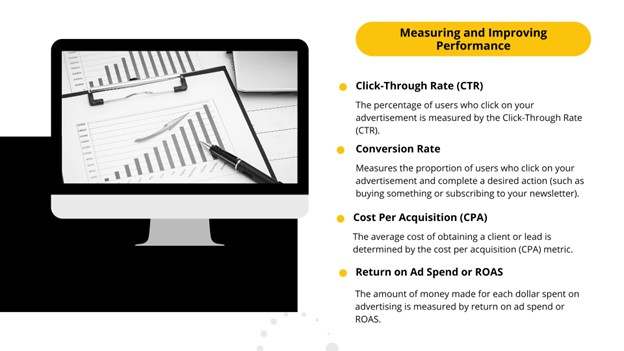
Measuring and Improving Performance
It’s critical to monitor key performance indicators (KPIs) like these to assess the effectiveness of your display advertising campaigns:
Frequently Asked Questions: Differences Between RDA and UDA
What are responsive display advertisements?
To accommodate different ad locations, responsive display adverts automatically modify their size and format.
Uploaded display ads: what are they?
Static ads with predetermined dimensions that you upload to the advertising platform are known as uploaded display ads.
RDAs or UDAs: which is better for small businesses?
Because of their versatility and user-friendliness, RDAs are typically ideal for small businesses.
Is it possible to use both uploaded display ads and responsive ads in the same campaign?
Yes, you can test various creative methods in the same campaign by using both RDAs and UDAs.
How can I improve the performance of my display ads?
High-quality images, persuasive ad copy, pertinent targeting, and ongoing testing and improvement are the main components of display ad optimization.

